CCS+ Trade Center
Role
Lead UX/UI Designer
Platform
Desktop · Tablet · Mobile
Users
10,000+ crew
Duration
2 years · 6+ sprints
Impact
~65% time reduction
When 10,000 crew members dread opening their scheduling app, every second of friction has a real operational cost. I led the redesign of CCS+ Trade Center — United Airlines' highest-traffic pilot-facing feature — from a system pilots feared to one they trusted.
One platform. 15,000 pilots.
Every scheduling decision they make.
CCS+ is United Airlines' internal scheduling platform built to replace two siloed legacy tools — the Crew Communication System (a 90s-era internal calendar) and Crew Companion (a third-party trading app). Both were non-responsive, completely disconnected, and deeply frustrating to use.
The Trade Center is CCS+'s highest-traffic feature — where pilots trade trips, pick up open time, submit requests, and verify schedule legality every single day. And it was universally dreaded.
The scheduling window is often minutes long. When a trip opens, the fastest pilot who can correctly evaluate it wins it. An interface requiring 30 seconds of manual re-setup before filtering isn't just annoying — it directly costs pilots income.
“Before CCS+, the tools were so outdated that pilots had to switch between two separate apps just to complete one task. There was no trust in the system. They were scared to click things.”
— Research finding across CLE, ORD, IAH pilot base sessions10k+
Active pilots using CCS+ daily
217
Trips visible per session — all scannable without navigating away
~65%
Estimated reduction in trip evaluation time
* Based on pilot feedback sessions
18mo
Deadhead complaint in backlog — resolved in one sprint
From legacy chaos
to structured clarity.
The three core screens from the legacy tools, paired with the CCS+ redesigns. The contrast makes the scope of the problem impossible to miss.
Pilot Pool Display
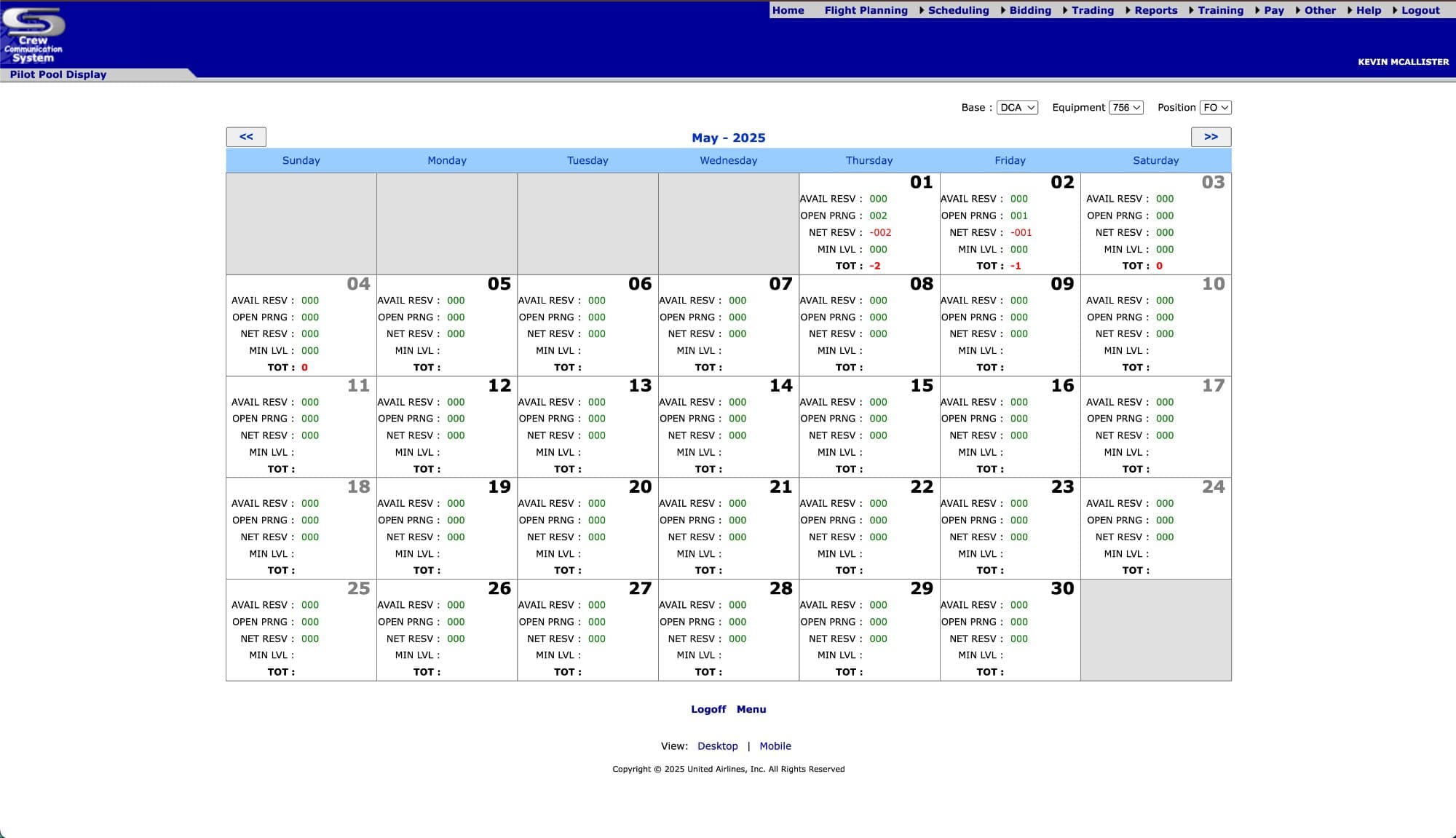
Legacy: Static monthly calendar grid showing raw reserve counts. No trip visualization, no pay data, no sorting.
What changed
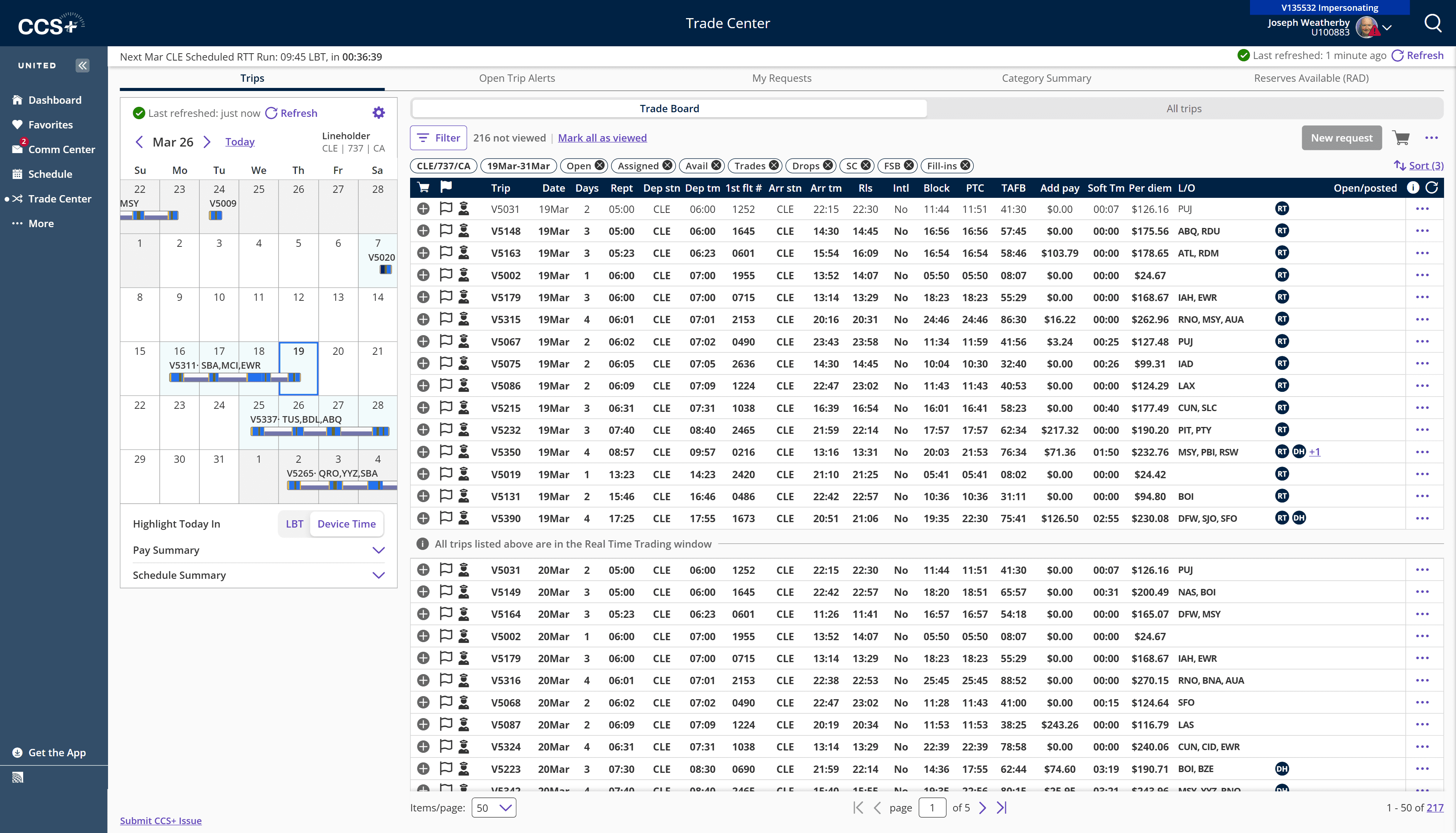
Pool visibility integrated directly into the Trade Board — no context switch, no separate app, no navigation away.
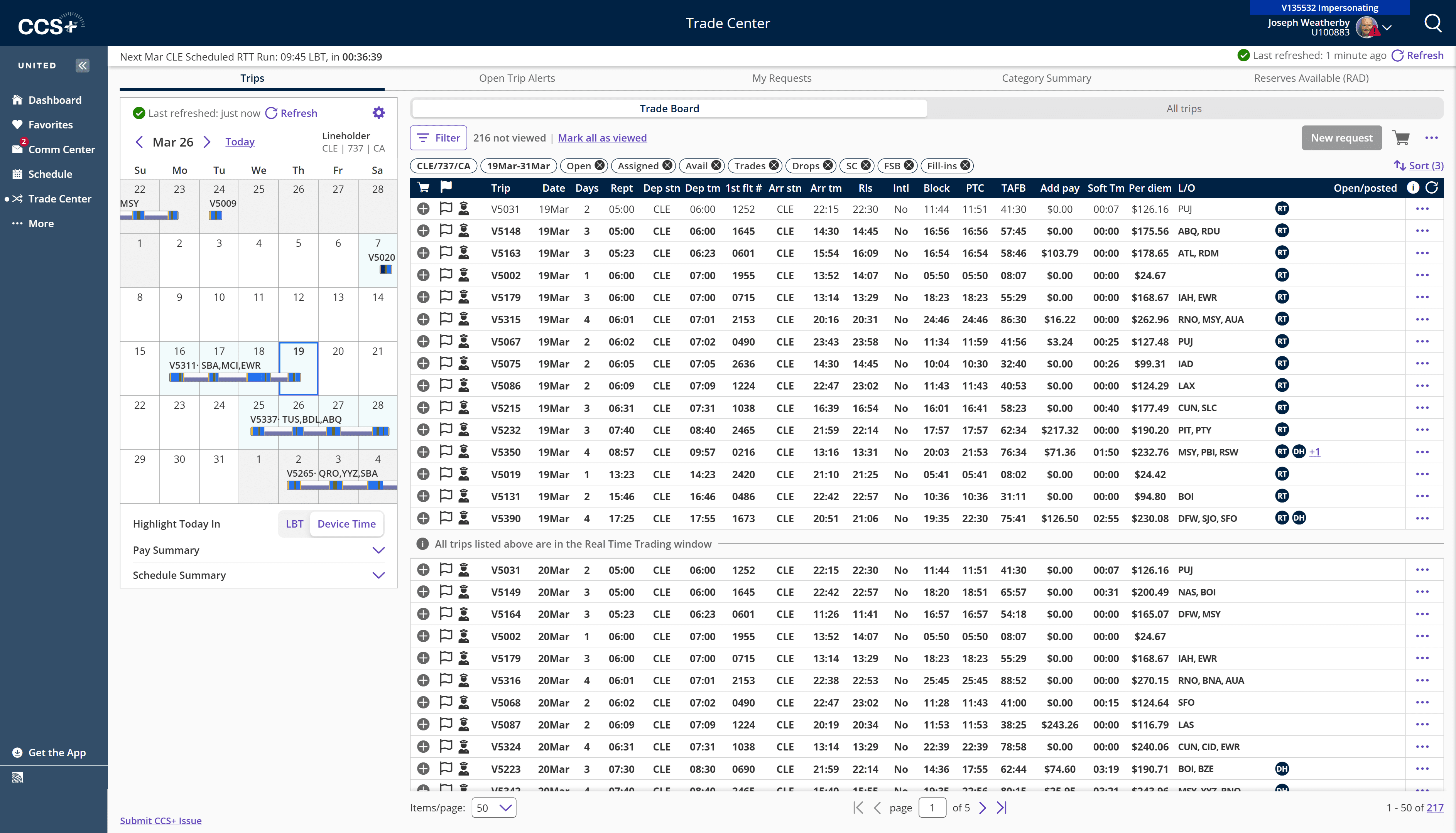
CCS+: Pool visibility integrated inline. Block, TAFB, pay, layovers per row. RT/DH badges. 217 trips — all scannable.
Trip Customization
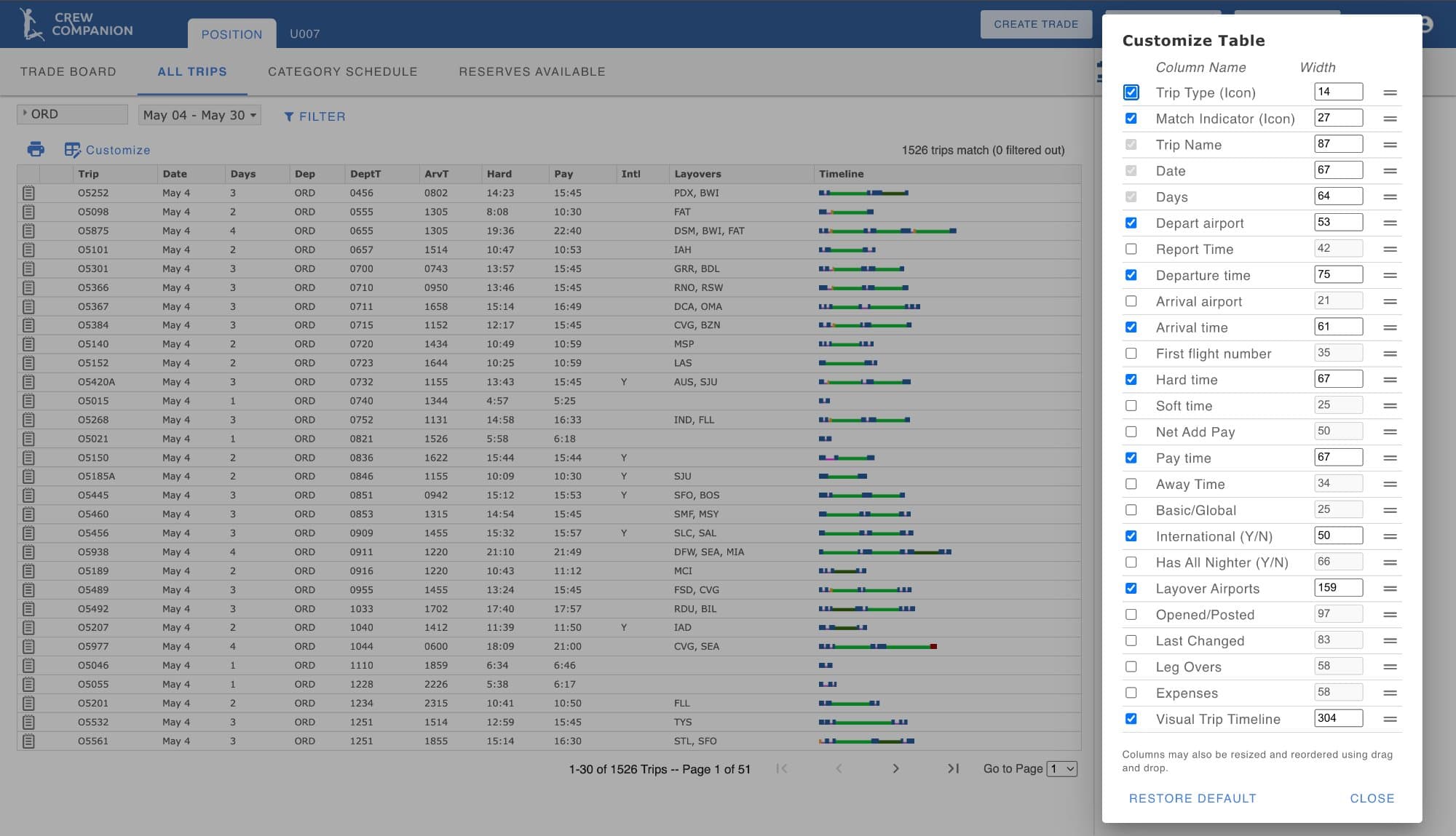
Legacy: Static checkbox list with manual pixel-width inputs. No live preview, no drag-and-drop, no multi-device support.
What changed
Pilots typed pixel widths with zero visual feedback. Redesigned with a live preview, drag-and-drop, and per-device breakpoint tabs in one reusable component.
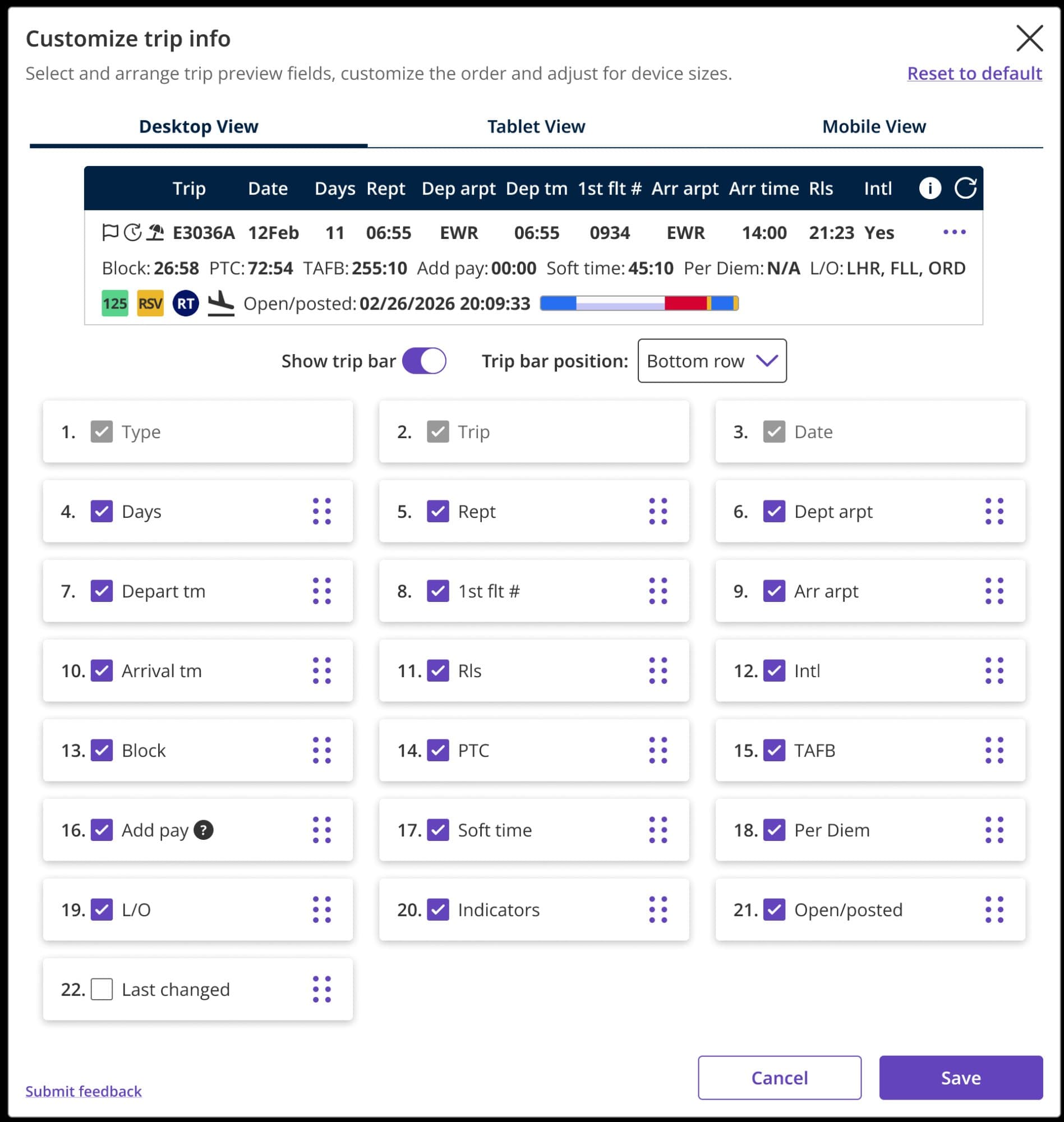
CCS+: Live preview, Desktop/Tablet/Mobile tabs, drag-and-drop reordering, required fields locked. One component, used everywhere.
Reserves Available (RAD)
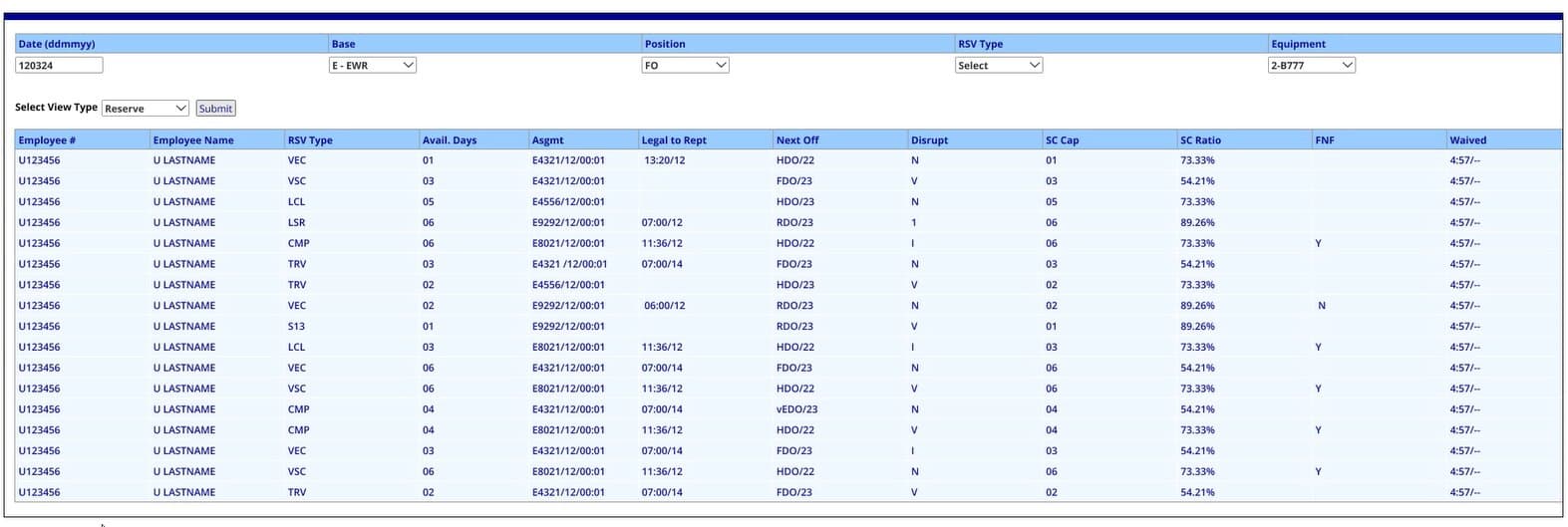
Legacy: Flat, ungrouped data table. No date grouping, no collapsible sections. Manual ddmmyy text input as the only filter.
What changed
Redesigned into date-grouped, collapsible sections with reserve type sub-groups and dropdown filters. Consistent with the CCS+ table system everywhere.
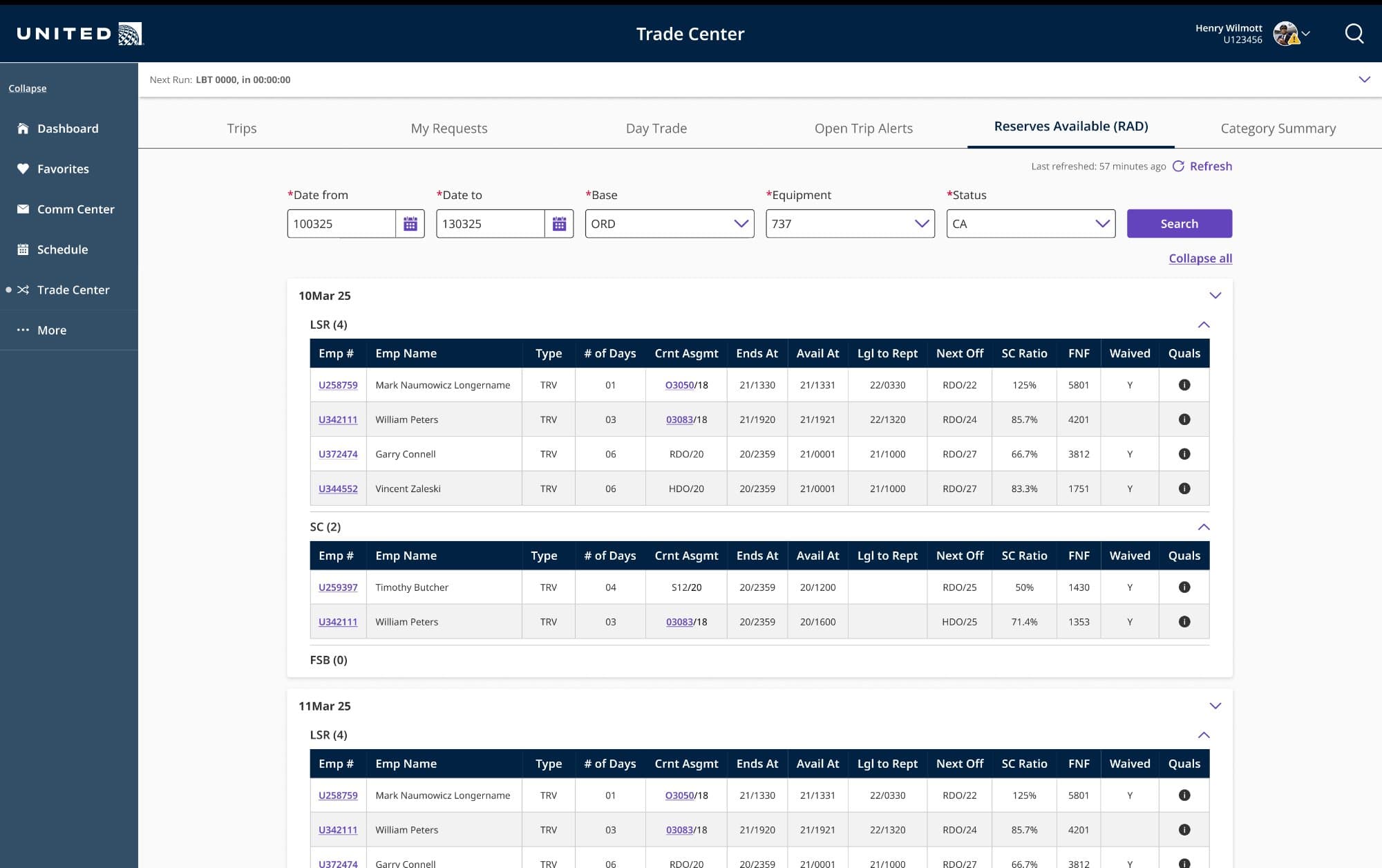
CCS+: Date-grouped collapsible sections with reserve type sub-groups (LSR, SC, FSB), dropdown filters, consistent with CCS+ table system.
The problem wasn't confusion.
It was dread.
Research sessions across multiple bases revealed something more nuanced than typical usability issues. Pilots weren't lost — they knew what the app was supposed to do. They just didn't trust it to do it without consequences. Pilots would hover over a button and pause, visibly unsure whether clicking would trigger something irreversible.
01
Information overload, no hierarchy
Hundreds of trips with identical visual weight. New trips, changed trips, and stale data looked exactly the same. Pilots scrolled endlessly.
“I can't tell which trips just opened up. Everything looks the same.”
02
Filter state reset every session
Base, equipment, and position had to be re-entered from scratch every session — every day, for years. The same 3-step ritual hundreds of times.
“I reset these filters every day. It's muscle memory — bad muscle memory.”
03
18 months of deadhead complaints
Pilots couldn't reliably distinguish deadhead (positioning) flights from operating ones. The DH indicator existed but was visually buried.
“I accepted a trip thinking I was flying it. I was DHing the whole first leg.”
01
The problem was trust, not confusion
10,000+ pilots using a scheduling app they dreaded. Legacy tools forced daily context-switching between two completely siloed systems. The Trade Center had no information hierarchy, no filter memory, no deadhead clarity, and no bid-period context.
From requirements to shipped code.
Every CCS+ feature followed the same four-stage repeatable process — increasing velocity while maintaining alignment with engineering, stakeholders, and the pilots who would use it every day.
01
Requirements & Stakeholder Alignment
Decomposed business requirements with product owners, engineers, and pilot union liaisons. Mapped every use case against real pilot workflows observed in research.
02
Wireframes & Information Architecture
Low-fidelity structuring of every screen. Established information hierarchy, interaction patterns, and navigation flows before any visual design began.
03
High-Fidelity Design & Prototyping
Pixel-level Figma designs with interactive prototypes. Validated with pilots via moderated usability sessions at CLE, ORD, and IAH bases.
04
Engineering Handoff & QA
Detailed specs with redlines, token references, and edge-case documentation. Stayed embedded with engineering through implementation for real-time decisions.
Five decisions that changed how pilots work.
Each grounded in research, complaint logs, and iterative testing. Each with downstream consequences across the platform.
Filters that already know who you are
Every pilot has a base, equipment type, and seat position. Before the redesign, every session started from zero — CLE, 737, Captain re-entered manually every single day. That's 30–40 seconds gone before useful work begins.
The redesign pulls these from the pilot's profile and pre-loads on session start. The filter modal uses a single configurable template component working identically across Trade Board and Category Summary.
Impact
Eliminated 3–5 repetitive inputs per session. First meaningful action 40+ seconds earlier. Zero daily re-entry for 10,000+ pilots.
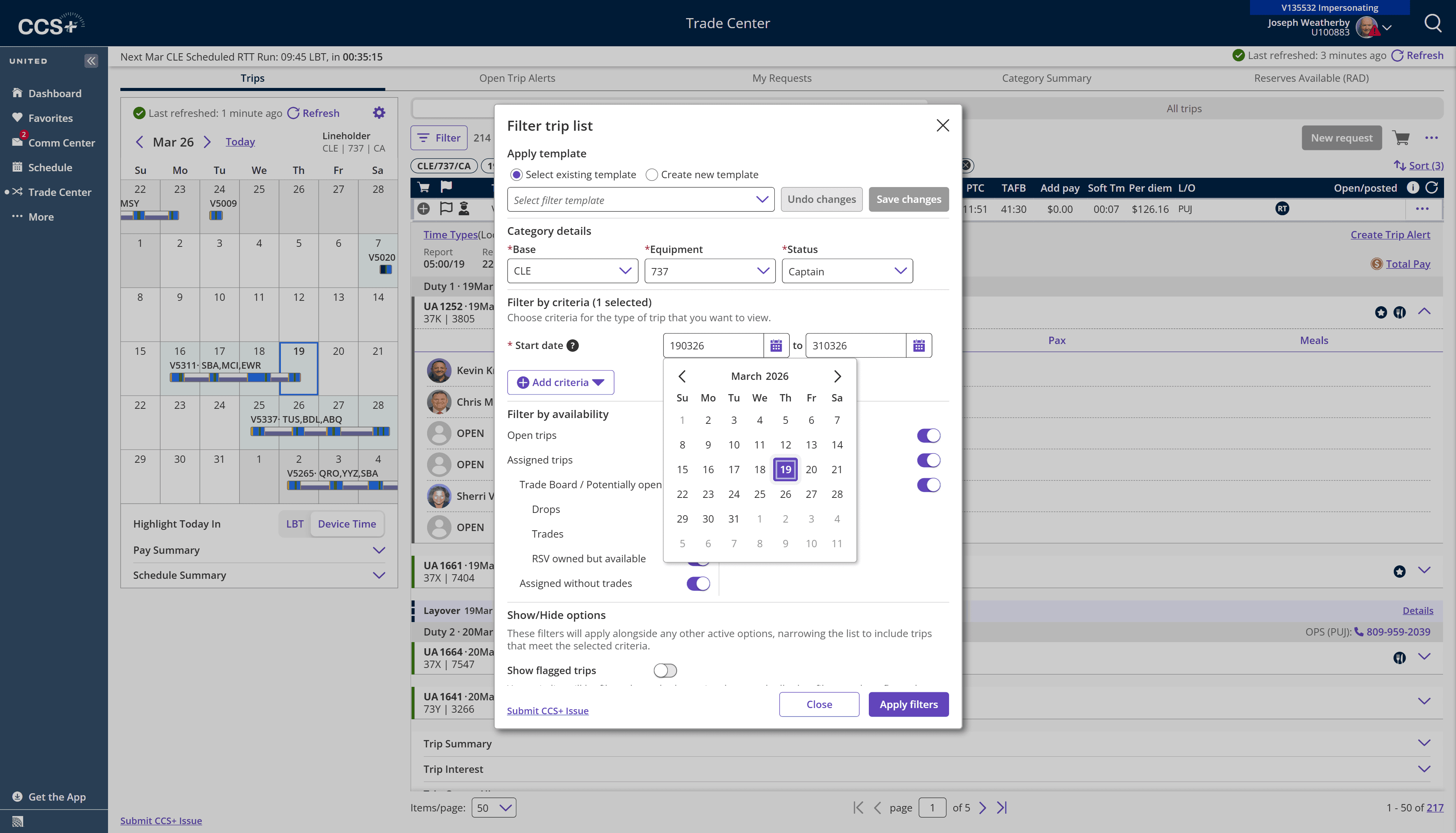
Filter panel: CLE/737/Captain pre-populated from pilot profile. Full calendar context, availability toggles, save-as-template.
Full trip detail without leaving the board
The previous design required navigating away to see flight legs, crew, and pay. Pilots lost their scroll position every time. Every navigation felt like a potential dead end — directly worsening the anxiety seen in research.
The redesigned board expands trips inline, directly below the row. Full duty timeline, crew manifest with seniority numbers, passenger count, and layover details — all in place. Board state preserved.
Impact
Evaluate and compare trips sequentially without losing board state. Look without touching — addressing the core fear of irreversible actions.
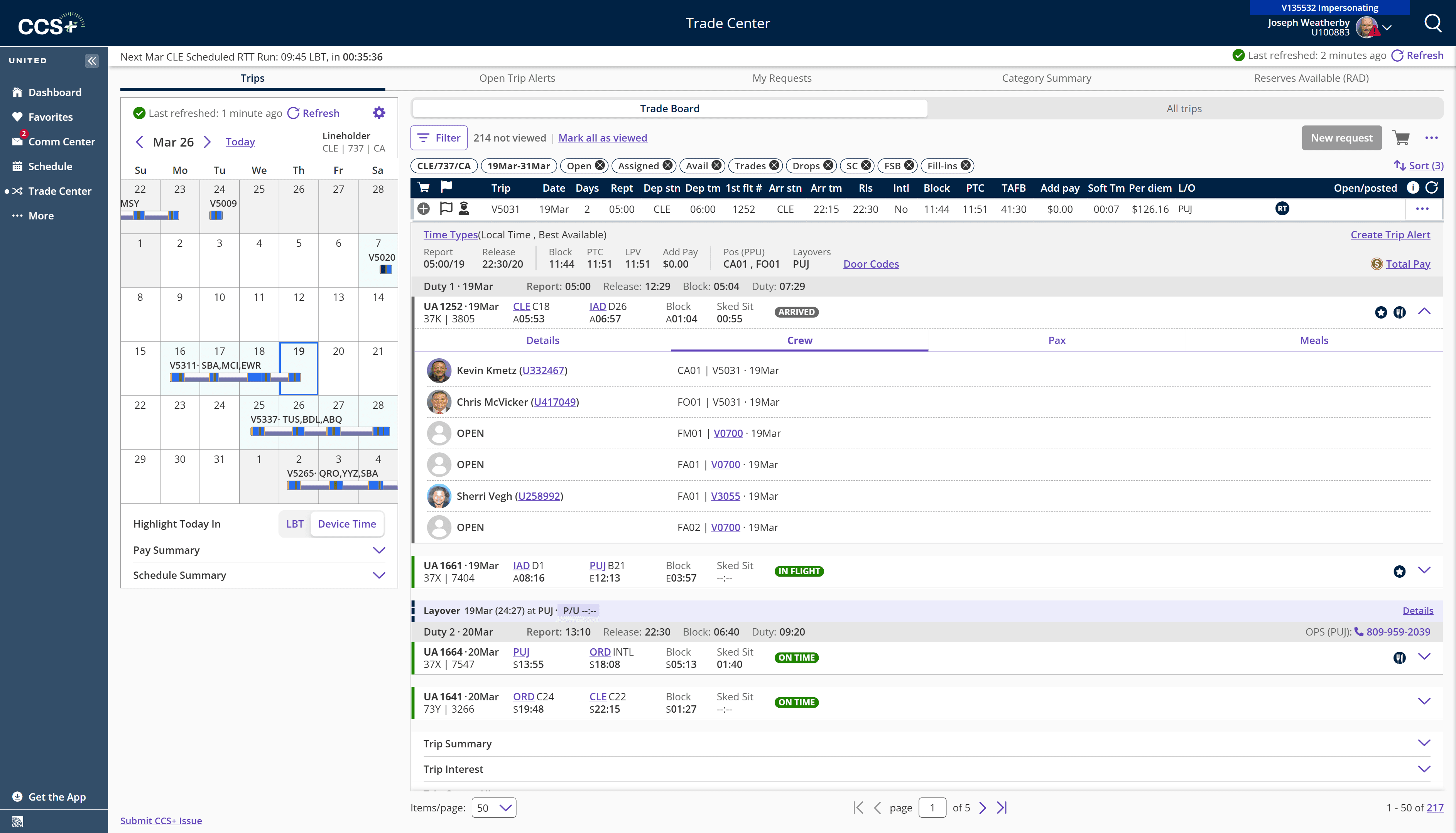
Trip V5031: Duty legs, crew manifest with CA/FO/FM/FA positions, open slots, block times — all without leaving the board.
The 18-month complaint fixed in one sprint
Deadhead (DH) flights are positioning legs — the pilot rides as a passenger. Confusing a DH leg with an operating one has real consequences: misunderstood workload, pay miscalculations, and scheduling errors hard to undo.
The complaint had sat in the backlog for 18 months. The fix: a persistent, high-contrast DH badge on every deadheading crew member, impossible to miss regardless of scan speed.
Impact
DH-related confusion dropped sharply post-launch. An 18-month backlog item resolved in one sprint with a precisely targeted intervention.
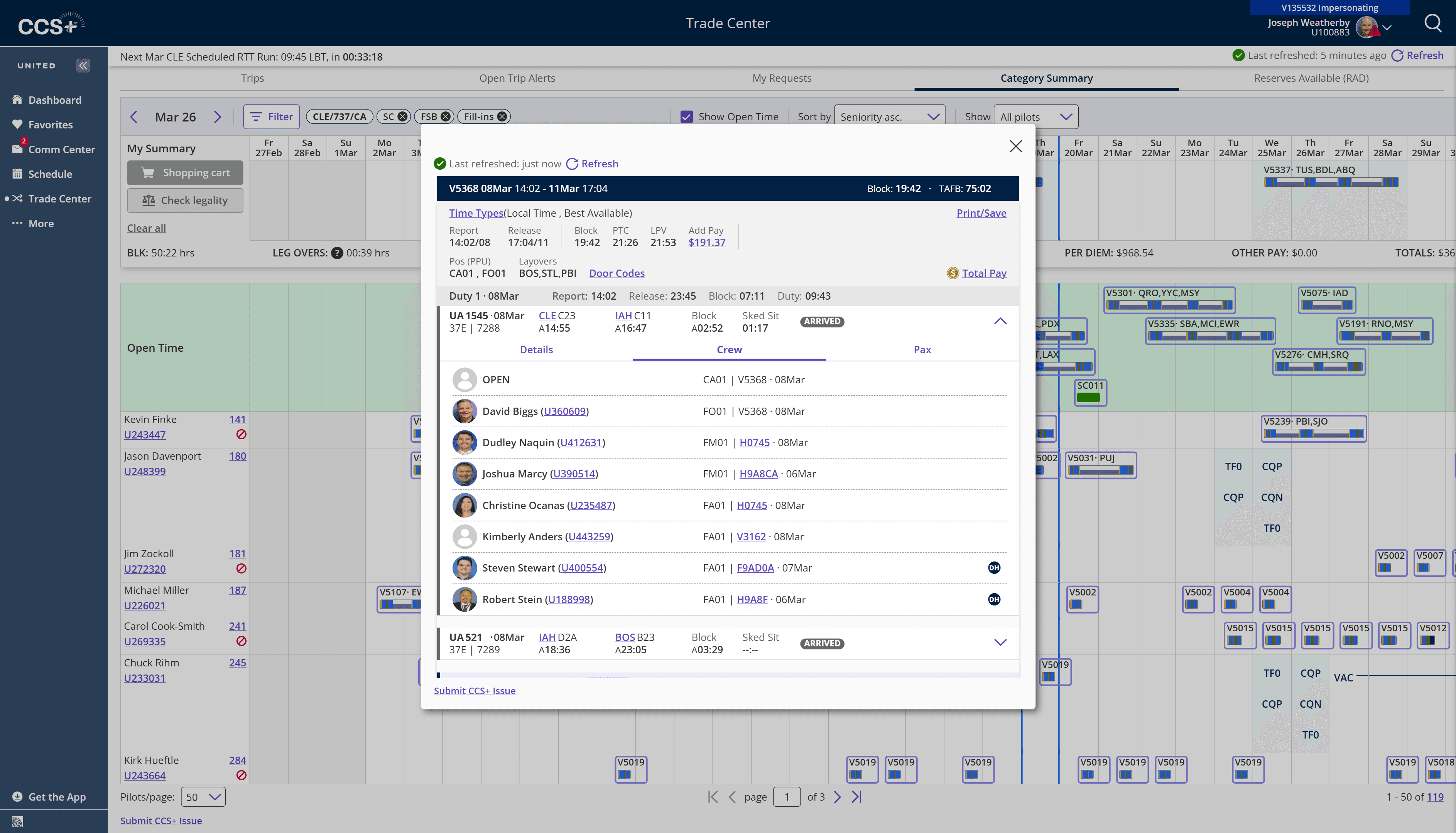
Crew tab: DH badges on crew members — immediately distinguishable from operating crew.
See the whole month before you commit to a trade
The list-only Trade Board was efficient for individual trip evaluation but blind to the full bid-period picture. Pilots made trade decisions without knowing how they'd affect the month — sometimes discovering conflicts only after submitting.
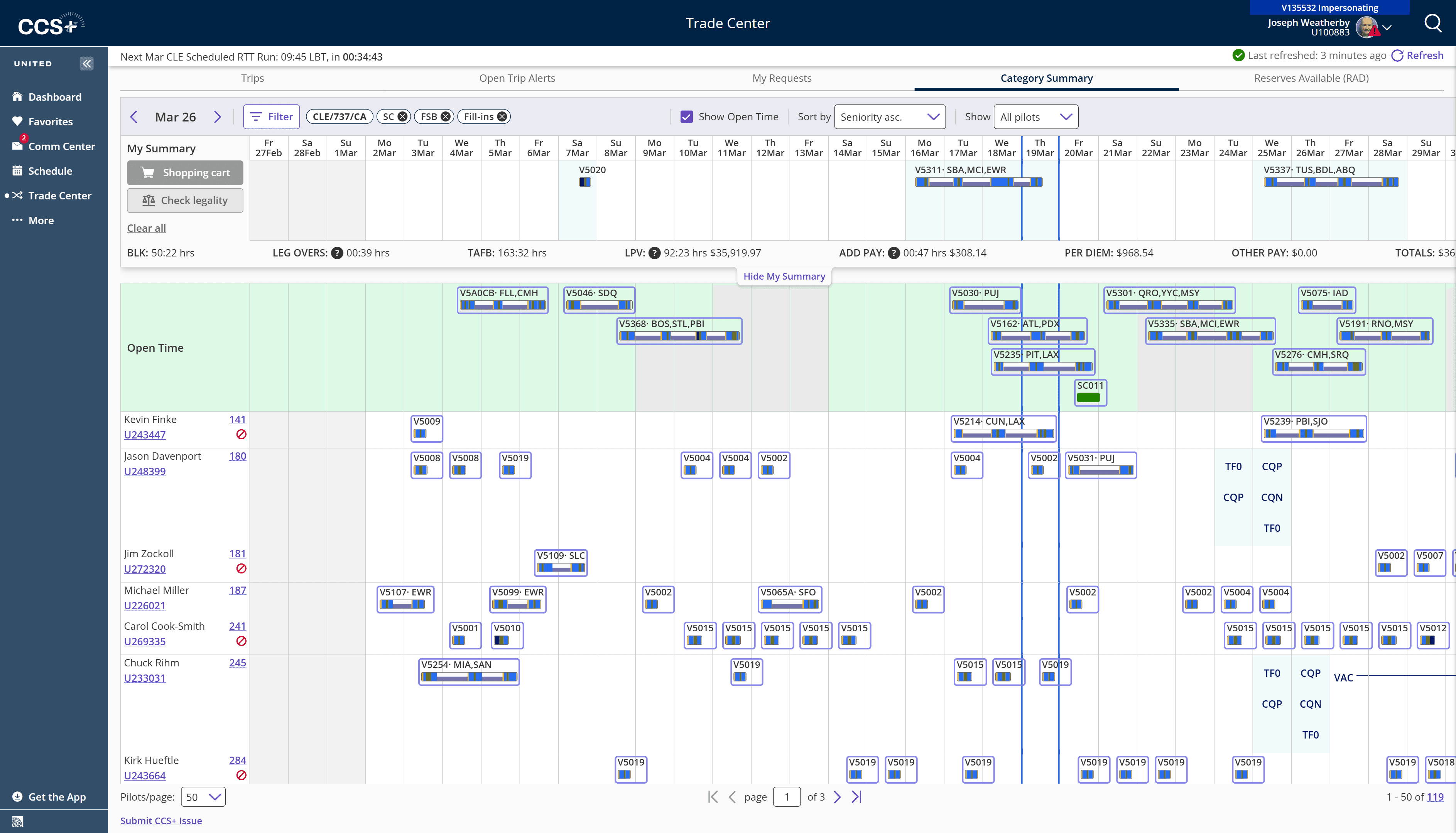
The Category Summary tab adds a Gantt-style view across the full bid period. Open trips float at the top. The pay footer shows live BLK, TAFB, and LPV totals — updating in real time.
Impact
Pilots answer "does this trade work for my month?" in seconds. Live pay footer. Open trips always visible at the top without scrolling.
Gantt view: Full bid period. BLK 50:22 · TAFB 163:32 · LPV $35,919 — all live.
One component. Consistent everywhere.
The Customize Trip Info modal needed to work across three contexts: Trade Board, Category Summary, and Open Trip Alerts. Rather than designing each separately — creating three different mental models — I designed one configurable component.
Desktop, Tablet, and Mobile tabs for per-device configuration. Required columns locked. Optional columns freely reorderable via drag-and-drop. Live preview always visible. Same modal, same behavior, everywhere.
Impact
One decision propagated consistently across the entire product. Reduced engineering rework. Pilots learn one system no matter which view they encounter it in.
One component: Desktop/Tablet/Mobile tabs. Live preview. 22 configurable fields. Required fields locked. Drag-and-drop reordering.
Designing inside real constraints.
CCS+ was built on an established design system, with engineering managing complex business rules, a compressed timeline, and stakeholders making decisions affecting 10,000+ pilots.
Established Design System
Built on United's internal component library — every new pattern needed alignment with existing conventions used across 12+ applications.
Complex Business Rules
Trip legality involves FAA rest requirements, union contract rules, equipment qualifications, and seniority hierarchies — all enforced in real-time.
Compressed Timeline
Major features shipped in 2-week sprints with stakeholder demos every cycle. No room for extended exploration phases.
Zero Downtime Tolerance
10,000+ pilots depend on CCS+ daily. Every release had to be backwards-compatible and deployable without service interruption.
10k+
Active pilots using CCS+ daily
~65%
Reduction in trip evaluation time
* Estimated from pilot feedback sessions
18mo
Backlog complaint resolved in 1 sprint
217
Trips per session, all scannable